Some words are meant for later.
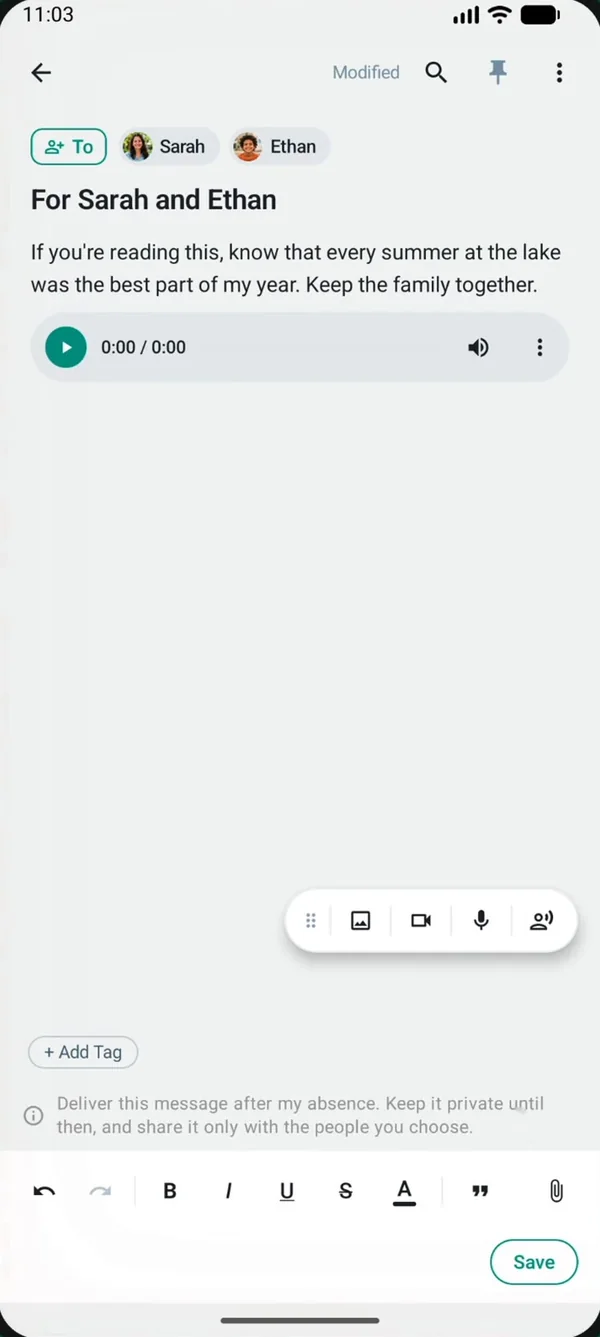
A last message is something you write now for the people you love, kept safe and delivered only after your death has been reported and confirmed by your closest family.
"Emma, James. Don't spend too long being sad. Keep Sunday lunch going, even when it's just the two of you. Water your grandmother's roses. And call each other more than you call me now."
An example written for this page. Your message is yours, in your own words.
A message from you, for after you.
It might be a thank you. An apology that never found the right moment. Where the important papers are. A recording of your voice saying something ordinary, because one day ordinary will mean a lot.
You can write to one person or to several people in your circle, and you can leave different messages for different people.
- Text, as long or as short as you like.
- A voice note, so they hear it from you.
- A photo that means something to both of you.
- A video clip.
- A document you want them to have.
Take your time. You can always come back to it.
There is no deadline and no right way to do this. A few lines today is better than a perfect letter that never gets written.
Choose who it's for
Pick one or more people from your circle. They're already in your FamRoot network, so there is no address to look up.
Say it your way
Write, record a voice note, or add a photo, a video clip or a document. Whatever feels most like you.
Change it whenever you need
Life changes, and so can your message. Edit it or delete it at any time. Nothing is sent until the verification below is complete.
Your closest family confirms it first.
A last message is never sent on one person's word. Delivery depends on your first circle, which FamRoot calls L1: your parents, your children and your siblings.
- A reportOne of your L1 relatives (a parent, child or sibling) reports your death on FamRoot.
- Two acknowledge itTwo people from your L1 circle must acknowledge the report.
- All L1 are toldEvery person in your L1 circle is notified about the report.
- If anyone disagreesIf any L1 relative marks the report as declined or spam, one more L1 approval is needed before it can go ahead.
- DeliveredOnce verified, your death is shared with your family, and your last messages go to the people you chose.
Built so one report on its own is never enough.
A false report is a real worry, so the process asks for more than one voice.
- Only your closest family can report. Parents, children and siblings. Not a friend, not a distant relative.
- One report is not enough. Two L1 relatives must acknowledge it.
- Everyone in L1 hears about it. All of your L1 relatives are notified, so the people most likely to know the truth see the report.
- Any of them can object. If someone marks it as declined or spam, an extra L1 approval is required.
We want to be honest about the limits too. The process relies on the people closest to you. A report on a living person can be declined by that person at any time, and a report that's declined or marked as spam cancels the process.
Kept private until it's time
- AES-256 encryption. Last messages are encrypted with AES-256.
- A separate Vault password. An additional layer of protection on top of your account login.
- Staff access, plainly. It is technically possible for FamRoot staff to access it. By process and policy, staff do not view this content, except where the law requires.
- Deleted with your account. If you delete your FamRoot account, your last messages are deleted too.
Questions about last messages
Who can report a death?
Only someone from your first circle (L1): your parents, your children or your siblings. Two people from your L1 circle must then acknowledge the report before anything moves forward.
What if someone reports my death by mistake?
A single report does nothing on its own. Two L1 relatives must acknowledge it, every L1 relative is notified, and if anyone marks it as declined or spam, one more L1 approval is needed. And if you're alive, you can decline the report yourself at any time, which stops it.
Can I change my last message later?
Yes. You can edit or delete a last message at any time, as often as you like.
Can I write different messages for different people?
Yes. A last message can go to one person or several people in your circle, so you can write something for your children together and something else for your brother.
What if the person I wrote to isn't on FamRoot?
Your message stays attached to their profile in your tree. When they join FamRoot, it's delivered to them once it's released. Nothing is lost in the meantime.
What if none of my parents, children or siblings use FamRoot?
Reporting isn't limited to your closest circle: relatives within two relationship levels can report and acknowledge a death. At least two relatives with verified mobile numbers are needed, so until enough of your family is on FamRoot, your messages simply stay sealed in your Vault.
Can FamRoot read my last message?
Last messages are encrypted with AES-256. Staff access is technically possible, but by process and policy, FamRoot staff do not view this content, except where the law requires.
What happens if I delete my account?
Your last messages are deleted along with your account. They will not be delivered.
Say it while you can choose the words.
Start with a few lines. You can come back and change them whenever you want.
Sign up for free