Your Network Includes More Than Family
Some of the most important people in your life aren't relatives. FamRoot keeps them in the same private network as your family, each with a label that reflects how close you really are.
Not everyone you know is a "friend" in the same way.
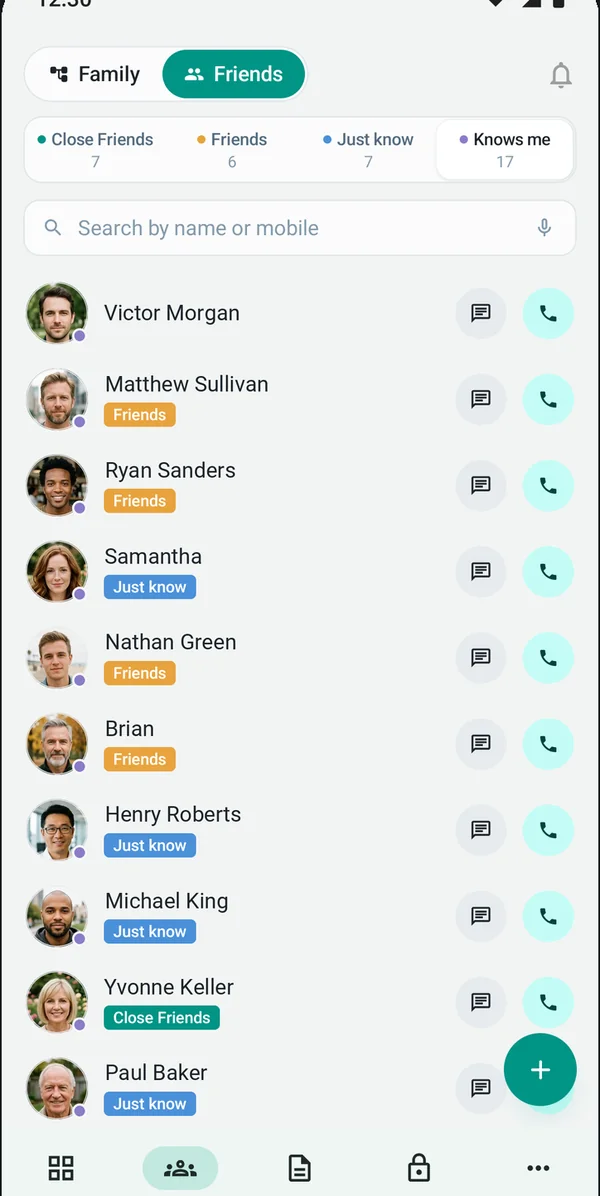
Social networks put everyone in one list. FamRoot lets you say how close each person actually is. You add people as Close friend, Friend or Just know. The fourth label, Knows me, fills itself.
The people who are basically family
The friend who has been at every birthday and knows your parents by name.
The people you're glad to have around
College friends, colleagues you stayed in touch with, the people you'd call when you're in their city.
People you just know
The neighbour two doors down. The parent you chat with at school pickup. Familiar, but not close.
People who have added you
Not a label you choose. Knows me lists the people who have added you to their network, like your father's old friend who remembers you as a child.
Friends see you. Your family tree stays with your family.
Adding a friend doesn't open up your family. A friend sees only your profile, not your family tree.
Your tree stays private to the relatives in it, connected within seven relationship levels. Your relatives' details are not shared with your friends.
- Your profile: visible to friends you add.
- Your family tree: visible to family only, with no public link.
Part of the same everyday experience as family.
Friends aren't a side list. They can be part of the moments, notes and messages you keep on FamRoot.
Moments
Photos and moments tagged to the people who were there, friends included.
Notes
Notes in text, voice or video, kept private or shared with the people you choose.
Future messages
A text, voice note or video written today, delivered to a friend on a birthday or a wedding day. How it works.
More ways to share, when you choose to.
Today, friends see your profile only. We are planning two optional ways to share more:
- Share your immediate family. Let friends see your first circle (parents, children, siblings), if you decide to.
- An expiring, read-only tree link. A link you can send to a friend that lets them view your tree for a limited time, without being able to change anything.
Both are planned and not available yet. We'll announce them on What's New when they are.
Why friends belong here
The neighbour who has known you since you were five. The friend your children call "uncle". A family network that leaves them out isn't the whole picture.
FamRoot keeps them in your network, with your family tree still private to your family.
Questions about friends
Will my friends see my family tree?
No. A friend sees only your profile, not your family tree. Your tree is visible to your family, within seven relationship levels.
What's the difference between "Just know" and "Knows me"?
"Just know" is a label you choose for people you know, but aren't close to. "Knows me" is not something you add. It lists the people who have added you to their network, like a family friend who remembers you from childhood.
Can I add a pet as a friend?
No. Pets belong on your family tree, with their own pet profile, alongside the rest of the family. More about pets.
What can I do with friends on FamRoot?
Friends can be part of the same everyday experience as family, including moments, notes and messages for the future.
Can I share my family tree with a friend?
Not today. Sharing your immediate family with friends, and an expiring read-only link to your tree, are both planned.
Does a friend need a FamRoot account?
No. You add a friend the same way you add a relative: by creating their profile, even if they're not on FamRoot yet. Adding a friend doesn't notify them, and you can choose to send them an invite to join.
Is it free to add friends?
Yes. FamRoot is completely free today, with all features included. If paid subscriptions are introduced in future, we will give reasonable notice, and nobody is charged without agreeing.
More answers in the FAQ.
Bring your people together.
Family, friends and the people in between, in one private network.
Sign up for free